——How to Build a Photography Portfolio That Actually Converts (From Zero)
By Daniel Hayes | Updated on April 23, 2026 | 🕓 12 minutes
Key Highlights
- What makes a photography portfolio actually convert clients instead of just “looking good”?
- How many images should a portfolio really include for maximum trust and clarity?
- What is “predictability” in a portfolio, and why does it matter more than creativity?
- How can beginners build trust without clients, reviews, or media features?
- Why do clients respond better to “use cases” rather than artistic presentation?
1. That Portfolio Nobody Is Asking About
It’s a weekend night. You’ve finally uploaded the last retouched photo. The website took three weekends to build. You bought a domain. You even designed a minimalist logo for that “professional” feel. Lying in bed, you refresh the page, looking at those dozens of images you’re most proud of—city light trails at night, café still lifes, a friend’s wedding shoot, street photography from your travels—and think: this should be enough to prove my skills, right?
Two weeks pass. You get traffic, but zero inquiries. Occasionally, someone emails, asks for your price, then disappears. You start to wonder: Is my pricing too high? Should I shoot more “better” work? Is my website not polished enough?
The problem isn’t that you don’t have a portfolio—it’s that your portfolio doesn’t give people a reason to buy.
At this stage, most photographers fall into a loop: shoot more → select more → upload more → expect more inquiries → get disappointed → shoot even more. They assume a portfolio is a container for “showing technique,” while ignoring the reality that in a commercial context, a portfolio is a filtering tool, a trust-building system, and a silent salesperson. It must answer three questions before a client even speaks: What can you do for me? Are you right for me? Can I trust you with my money?
This article won’t teach you how to create cinematic tones in Lightroom or which website builder looks best. We’re going to focus on something else: how to build a photography portfolio from zero that actually brings in clients—a system that turns “views” into “inquiries,” and “inquiries” into “paid work.”
2. Redefining the Portfolio: Not “Display,” but “Client Filtering”
Let’s break a deeply rooted misconception.
Wrong belief: A portfolio = how good my photos are
Correct belief: A portfolio = why a client should choose you instead of someone else
When you treat your portfolio as a “technical showcase,” you instinctively include:
- That perfectly exposed sunset (even though no one will pay you to shoot sunsets)
- That cleverly composed street photo (even though clients don’t see how it relates to their needs)
- That portrait you spent three hours retouching (even though clients care more about whether it helps them sell)
But when you treat your portfolio as a “conversion system,” you start asking:
- Who is my target client? In what situations do they need photography?
- After seeing these images, can they immediately think: “This is exactly what I want”?
- Do they trust me enough to take the next step and contact me?
Here’s a model I often use to recalibrate every decision in a portfolio:
Portfolio = Proof + Positioning + Predictability
Proof: You’re actually good. This is the baseline—and most people stop here.
Positioning: Who you are for. You’re not trying to convince everyone; you’re filtering for the right people.
Predictability: Can a client feel safe paying you? This comes from consistency, professionalism, and trust signals.
Most failing portfolios only have Proof, but lack Positioning—and completely miss Predictability. They’re like resumes without context: a list of skills that never answers “why you” or “what can I expect.”
3. From Zero: Building a Portfolio That Gets You Hired
Step 1: Don’t Start by Shooting—Start by Choosing a “Paid Scenario”
You don’t lack photos—you lack scenarios people will pay for.
Too many portfolios look like visual diaries: street, landscapes, pets, weddings, travel—all mixed together. Each image might be good on its own, but together, clients feel confused: what exactly do you do?
Compare these two portfolios:
Portfolio A (Random Mix):
- City light trails
- Café still life
- Friend’s wedding
- Street photography
- Pet portraits
Portfolio B (Scenario-Focused):
- Café brand visuals (menu + space + atmosphere)
- Bakery product photography (delivery platforms + social media)
- Personal branding portraits (entrepreneurs/freelancers)
The problem with A: clients can’t map themselves into it.
The strength of B: each project is a specific commercial use case clients can immediately imagine themselves in.

Image credit: Cayla Zahoran Photography
Practical method: Ask yourself 3 questions
1. Who would pay for this kind of photo?
Not “people who like photography,” but people who need images to solve problems.
Who exactly? Café owners? E-commerce sellers? Brides?
2. Where do they show up?
Instagram? Pinterest? LinkedIn? Local business groups?
This determines where your portfolio lives and how you speak.
3. Why do they need these photos?
To attract customers? Document a life event? Build authority?
This “why” becomes the true theme of your portfolio.
Recommended starter scenarios (ranked):
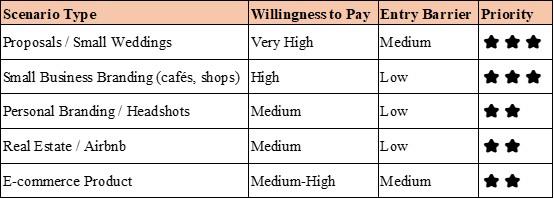
Key rule: Start with ONE scenario.
“I'm a café brand photographer” beats “I shoot everything.”
Step 2: Replace “Waiting for Clients” with “Simulated Projects”
Your first portfolio will likely need fake clients—but real problems.
Many beginners get stuck: no clients → no work → no portfolio → still no clients.
The solution isn’t waiting—it’s creating.
How to create a simulated project:
Find a real setting—like a local café. Observe:
- Are their menu photos low quality?
- Is their social media inconsistent?
- Do their interior shots lack atmosphere?
Then write your own brief:
```
Project: Café Brand Visuals
Client Type: Local neighborhood café
Goal: Increase Instagram reach and local foot traffic
Deliverables: 5 product images, 3 atmosphere shots, 2 barista shots
Usage: Social media, Google Maps, delivery apps
```
Then shoot based on that.
Not “what I want,” but “what the client needs.”
Ask during shooting:
- Where will this image be used?
- Will it make someone want to visit?
- Does the set feel consistent and recognizable?
The value here isn’t pretending—it’s training client thinking.
Step 3: Every Project Must Answer a Question
Don’t just show images. Add project context—in the client’s language.
Bad example:
“Soft light gently touched the coffee cup...”
Good structure:
```
Project: Café Brand Visuals

Client Type: Independent café (6 months old, relies on Instagram)
Goal: Build consistent visual identity
Approach: Morning natural light, warm tone, Instagram grid-friendly compositions
Deliverables: 10 edited images (square + vertical formats)
Result: Engagement increased by 40% within 2 weeks
```
If no real results:
```
Intended Use: Designed for Instagram and menu display to create a recognizable brand aesthetic.
```
Honesty beats exaggeration.
Step 4: Control Quantity—Less but Predictable
Mistake: 30–50 images to “show versatility.”
Better: 5–8 consistent images per project.
There’s a psychological concept called the Representativeness Heuristic: people infer the whole from a small sample. If your 8 images are stylistically consistent and reliably high-quality, clients will assume: “If I hire you, I’ll likely get results like this.” If your 50 images vary wildly in style and quality, clients will assume: “This feels like a gamble—I don’t know what I’ll get.”
Curation rules:
- Remove images selected purely based on personal attachment (“I worked really hard on this” is not a valid reason to keep it)
- Remove images without commercial context (that perfect sunset—unless you’re a landscape photographer)
- Remove stylistically inconsistent images (don’t mix black-and-white street photography with bright product shots)
Suggested structure:
- Homepage / first screen: 3–5 strongest images (capture attention within 3 seconds)
- Per project page: 5–8 images (show completeness without causing fatigue)
- Total projects: start with 2–3 complete projects, no more than 5
Step 5: Add Trust Signals—Even as a Beginner
Many people get stuck here: I don’t have client testimonials or media features—how do I build trust?
Trust ≠ big clients.
Trust = predictable experience.
You can show:
- Behind-the-scenes photos (process proof)
- Clear workflow (consult → shoot → delivery)
- Style consistency statement
- Positioning statement
Example:
“I help small food businesses build visual identity.”
4. Portfolio Mistakes That Quietly Kill Your Income
Mistake 1: Too Many Styles = No Style
Clients think: “You do everything → you specialize in nothing.”
Solution: Start by showcasing only one niche. Expand only after you’ve built stable demand in that area.
Mistake 2: Showing “Beauty” Without “Use”
Commercial clients don’t buy “beauty.” They buy conversion, exposure, and brand perception.
Self-check question: Can each image help a client imagine how they would use it?
If not, it might just be a “beautiful but useless” image.
Mistake 3: Photographer Language Instead of Client Language
Photographers care about: light, composition, depth of field, color grading.
Clients care about: will this attract customers? Will this make me look professional? Will this help me sell?
Don’t say:
“Shot with natural light and a 35mm prime lens to create shallow depth of field.”
Say:
“These images are designed for social media, highlighting product texture so customers can instantly see freshness.”
Mistake 4: No CTA
You need:
- Clear contact options (not just an email—ideally a booking link or inquiry form)
- Simple action guidance: “Tell me about your project” works far better than “Contact me”
- Low friction: don’t make clients write a long email—ask 2–3 simple questions instead
5. A 7-Day Execution Plan
Day 1–2: Choose a monetizable scenario
- Pick only one scenario from earlier suggestions
- Define your target client: age, profession, pain points, platforms
- Study 3 successful portfolios in that niche (not to copy, but to understand positioning)
Day 3–4: Design and complete a simulated shoot
- Find a real setting (café, friend’s shop, your own items)
- Write a full brief (client requirements document)
- Shoot with commercial intent: usage context, platform format, consistent style
- Key: imagine the client standing next to you asking, “What will this photo do for me?”
Day 5: Select images (max 8)
- Prioritize consistency over individual impact
- Remove images without commercial context
- Ensure the set allows clients to predict outcomes
Day 6: Write project descriptions (in client language)
- Use the provided template
- Answer: who is it for? what problem does it solve? what happens if used?
- Avoid: technical jargon, artistic language, personal emotions
Day 7: Publish (even if it’s just a simple page)
- One-page site > complex portfolio (reduces friction)
- Must include: project description, process images, contact, simple CTA
- Test immediately: send to 3 potential clients or friends and ask:
- “After seeing this, would you consider contacting me? Why or why not?”
Key mindset: a “usable” portfolio beats ten planned ones.
Your first version doesn’t need to be perfect—it needs to exist.
6. Design a “Visual Sales Funnel”
Top: 3-second hook
- One powerful image
- Clear positioning
- Simple CTA
Middle: Risk reversal (Before/After)
Show transformation.
Bottom: Action trigger
- “Tell me about your project”
- 3-field form
- Clear expectation
7. Niche Strategies
Different clients make decisions differently.
Wedding Photography: Emotion timeline > single perfect shot
Clients aren’t buying one perfect image—they’re buying a full-day emotional narrative.
Portfolio structure:
- Chronological flow: preparation → ceremony → reception → farewell
- Show adaptability across lighting and emotional situations
- Include process explanation: how you handle unexpected moments
Commercial Portraits: ROI visibility > artistic expression
Clients (businesses or personal brands) want results: credibility, opportunities.
Portfolio structure:
- Show real usage: LinkedIn, websites, event posters
- Include before/after comparisons
- Highlight experience: efficient, professional, comfortable for non-models
Product Photography: Problem-solving > aesthetics
Clients want sales impact.
Portfolio structure:
- Show multi-platform usage: e-commerce, social, ads
- Explain shooting logic: highlighting features, handling reflections
- Emphasize scalability: consistent style for product lines
Documentary / Street: Narrative completeness > technical specs
Harder to monetize, but viable if focused.
Portfolio structure:
- Show complete projects, not single images
- Emphasize depth and long-term engagement
- Clarify applications: editorial, brand storytelling, nonprofits
8. Closing the Distance with Clients
Don’t say: “I have years of experience.”
Say: “This was my 47th wedding—I’ve identified 3 recurring issues and how to handle them.”
Specifics build trust more than vague claims.
Authority Building: Client Words > Media Logos
“As seen in [magazine]” can backfire if clients don’t recognize the brand.
Better approach:
- Quote real client feedback: “These product photos increased our delivery orders by 30%”
- Show real problems solved: “Customers couldn’t read the menu—after reshooting, complaints dropped”
Authentic Anchors: Show Real Struggles
Not motivation—relatability.
“At first, I thought making coffee look beautiful was enough. Then a client said customers couldn’t tell cup sizes. That’s when I realized: commercial photography isn’t art—it’s problem-solving.”
This builds more trust than pretending constant success.
The Business Logic Behind Style Consistency
Explain your style as strategy, not taste.
“I use natural light and minimal editing because my clients—small food brands—need images that feel real and approachable, not distant or overly stylized. Customers should think ‘I can go there,’ not ‘this looks too expensive.’”
9. Action Checklist
Remove:
〇 Random work
〇 Technical talk
〇 Too many images
〇 No CTA
〇 Long “About me”
Add:
〇 1 process image
〇 1 simulated project
〇 1 client-perspective explanation
Long-term:
- Collect feedback
- Align with social media
- Update seasonally
Final Thought
A portfolio is not a summary of your past—it’s the starting point of your next job.
Clients don’t buy photos.
They buy predictable results.
You’re not showcasing art.
You’re offering a solution.
FAQs
1. How many photos should I include in my portfolio?
Typically 5–8 images per project, with 2–3 strong projects at the beginning stage. Too many images reduce clarity and weaken positioning.
2. Do I need real clients to build a portfolio?
No. Simulated projects based on real business scenarios can be just as effective if they demonstrate client thinking, consistency, and use-case relevance.
3. How do I build trust if I have no testimonials?
Through process transparency, consistent style presentation, clear workflow descriptions, and realistic project breakdowns.
4. Should I focus more on artistic photos or commercial photos?
If your goal is client acquisition, commercial intent and usability matter more than pure artistic expression.
References
1. Kahneman, D., & Tversky, A. (1974). Judgment under uncertainty: Heuristics and biases. Science, 185(4157), 1124–1131. [https://doi.org/10.1126/science.185.4157.1124]
2. Nielsen Norman Group. (2023). Trust and credibility in web design. [https://www.nngroup.com/articles/trust-credibility/]
3. Kotler, P., & Keller, K. L. (2022). Marketing management (16th ed.). Pearson.
About the Author
Daniel Hayes
Focus: Monetization Models, Platforms, Creative Income
Daniel Hayes explores different monetization paths in photography—from stock platforms and content licensing to online portfolios and creator economies. His work analyzes how photographers build income streams beyond traditional client work.
Editorial Transparency Statement
This article is written based on practical industry knowledge, established marketing principles, and widely recognized psychological research on decision-making and consumer behavior. No client-specific confidential data or unverifiable case studies are included.
The recommendations provided are intended for educational and informational purposes and reflect general strategies that may vary depending on individual market conditions, niche, and geographic region.
Disclaimer
The content in this article is for informational purposes only and does not guarantee specific business outcomes, client acquisition results, or income levels. Photography markets vary significantly based on location, competition, experience level, and niche specialization.
Readers should apply these strategies based on their own circumstances and, when necessary, seek additional professional or business advice tailored to their situation.
Recommend:

The Hidden Risk of Building a Photography Portfolio on Third-Party Platforms

Event Photography: How to Start, Get Booked, and Actually Make It Worth It

When Clients Say “Too Expensive”—What They Really Mean (And How to Respond Without Lowering Your Price)
How to Set Up a Reliable Photography Workflow from Shooting to Delivery