By Ethan Cole | Updated on April 23, 2026 | 🕓 12–15 minutes
Key Highlights
- Why does your brain perceive a clear scene while your camera records motion blur?
- Why do smartphones, cameras, and action cams require completely different shooting strategies?
- What shutter speed actually works at different vehicle speeds?
- When should you give up on sharpness and embrace motion blur instead?
- How can “failed” photos from a moving vehicle still become your best images?
Neuroscience research shows that when we rapidly move our eyes (saccades), the brain actively suppresses visual processing to prevent the perception of blur caused by fast motion on the retina—this is known as saccadic masking.
Try this: while sitting in a moving car, stare at a nearby pole outside the window, then quickly shift your gaze to a distant mountain. You’ll notice something interesting—the world doesn’t smear into a blur during the eye movement. But if you record a video at that moment, the footage will be full of motion blur.
When you look out of a car window and feel like everything is “clear,” it’s because your brain is actively deleting the blurry frames in real time. A camera doesn’t do that—it records physical reality.
1. Device Divide: Phones, Cameras, and Action Cams Require Completely Different Strategies
Don’t mix strategies. These three types of devices behave very differently in motion:
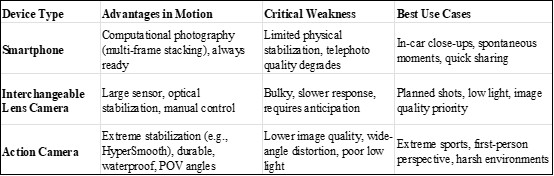
Key decision point: If you’re a casual traveler, a smartphone + understanding its computational limits is more important than carrying a camera.
Professional photographer Easton Chang points out that in car photography, when panning to track a subject, shutter speeds around 1/30 to 1/60 second can keep the subject sharp while introducing motion blur in the background. But for smartphone users, this is largely irrelevant—phones will override these settings automatically.
2. For Smartphone Users: Breaking the “Protection Mechanism” of Computational Photography
Smartphones are designed to eliminate blur—but you can work with or around these systems.
2.1 Use Live Photos (iPhone) or Long Exposure Mode (Android)
Steps:
1. Enable Live Photos (iPhone) or Motion Photo (Android)
2. Open the image in your gallery and swipe up
3. Select the “Long Exposure” effect
Your phone will stack frames from a short video (around 3 seconds) to simulate a slow shutter effect.
Best for: flowing clouds, light trails, moving crowds
Limitations: requires a relatively stable subject and moving background. If the phone itself is shaking (e.g., in a bumpy car), results may fail.

2.2 Force Manual Control (Pro Mode)
Three critical settings:
l Shutter Speed (S) — based on vehicle speed
- Walking/static: 1/125s+
- City traffic (30–50 km/h): 1/250–1/500s
- Highway (100 km/h+): 1/1000s+
l ISO — set to auto, but cap it (e.g., ISO 1600) to avoid excessive noise
l Focus — switch to manual focus (MF) and lock distance to prevent focus hunting
Key principle: Shutter speed comes first.
Photographer Benjamin Jaworskyj suggests that to freeze motion, shutter speed should exceed 1/1000 second, especially in fast-moving environments.

2.3 Physical Stabilization (Zero Cost)
l Use both hands and keep elbows close to your body
l Find support points (window frame, seat headrest, etc.)
l Use volume buttons as shutter
l Pre-press the shutter: anticipate and shoot slightly before the moment
3. For Camera Users: A Decision Tree Based on Shutter Speed
If you’re using an interchangeable lens camera, everything comes down to precise shutter speed control.
3.1 Modified “Safe Shutter” Rule for Motion
The traditional “1/focal length” rule only applies when stationary. In moving vehicles, you must factor in speed.
Simplified reference (50mm lens):
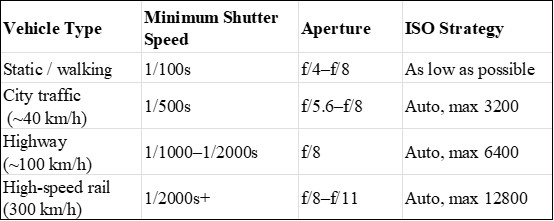
Why stop down aperture?
In motion, precise focus is difficult. A smaller aperture (f/8–f/11) increases depth of field, improving your chances of getting a usable shot.
3.2 Stabilization Mode Matters
Some cameras (e.g., Fujifilm) offer a “+MOTION” stabilization mode that adjusts shutter behavior when motion is detected.
Recommended:
l In vehicles: “CONTINUOUS + MOTION”
l Half-press shutter to activate stabilization before shooting
3.3 Focus Strategy: Abandon Single AF
Use continuous autofocus (AF-C / AI Servo) with zone focusing.
Advanced tip: Use pre-capture features (e.g., Olympus Pro Capture, Sony Pre-AF) to buffer frames before fully pressing the shutter.
My Current Settings
Smartphone (iPhone 14 Pro):
l Settings → Camera → Preserve Settings → Exposure Adjustment: ON
l Shooting:
- City (~40 km/h): 1/500s
- Highway: 1/1000–1/2000s
- Night: give up, or shoot video and extract frames
Secret weapon: Keep Live Photo ON. Long exposure can occasionally save a blurred shot.
Camera (Fujifilm X-T4):
l Mode: Shutter Priority (S)
l Stabilization: CONTINUOUS + MOTION
l ISO: Auto (max 6400)
l Focus: AF-C, zone
Key trick: Pre-press shutter to activate stabilization ~0.3 seconds early.
4. Vehicle-Specific Tactics
4.1 Car / Taxi
Problems: reflections, low-frequency vibration, bumps
I found that a car is most stable when moving at constant speed on smooth roads—not when stopped. Idling vibration is worse than steady motion.
Rest your hand on the window frame and feel the vibration. When the low-frequency “hum” becomes stable and consistent, that’s your window. Usually just a few seconds—press the shutter half a second early.
l Press camera against glass (use dark cloth to reduce reflections)
l Best subjects: mid-to-long distance scenes
Avoid: night lights (they turn into streaks)
4.2 High-Speed Train

Problem: extreme lateral motion (~83m/s at 300 km/h)
High-speed trains are too fast. Any close subject is a disaster.
But distant scenes work better: the farther the subject, the weaker the relative motion.
l Shoot skylines, fields, horizons
l Try panning with parallel-moving subjects
l Experiment with intentional blur (e.g., 1/60s)
Sometimes it fails. But when it works, it looks like a painting.
4.3 Airplane Window
Problems: reflections, double glass, distortion
Use dark clothing or a hood to block light, press lens against the window, and use manual focus—autofocus will lock onto dust or reflections.
Shoot clouds, wings, sunrise/sunset color shifts—these don’t need sharpness, only atmosphere.
Avoid: ground detail
4.4 Walking / Cycling
Problems: body sway, uneven ground
l Lower center of gravity
l Use action cams (e.g., GoPro) for POV
l Shutter:
- Walking: 1/125s+
- Cycling: 1/250s+

5. Turning “Bad Shots” into Usable Images
Don’t delete everything. Some “failures” have emotional value.
5.1 Slight Blur (Technical Error)
l Characteristic: edge ghosting, but recognizable subject
l Fix: AI sharpening (Topaz, Photoshop, Remini)
l Prevention: faster shutter or support
5.2 Motion Blur (Creative Material)
l Characteristic: streaked background, or full motion blur
l Use: embrace it as style—adjust contrast and white balance
5.3 Composition Drift (Crop Recovery)
l Characteristic: subject off-frame, tilted horizon, unwanted elements
l Fix: crop in post
Always shoot wider than needed. Leave 20% margin.
6. Field Checklist
Before shooting:
〇 Clean lens
〇 Check battery/storage
〇 Install manual camera app
During shooting:
〇 Observe vibration for 30 seconds
〇 Use shutter priority
〇 Shoot bursts (3–5 frames)
〇 Find support
〇 Leave cropping space
After shooting:
〇 Accept 70–90% failure rate
〇 Tag salvageable shots
〇 Keep unexpected favorites
7. Final Thought: Why I Still Shoot in Motion
The best moments in travel rarely wait for you.
A reindeer crossing a highway. Neon lights flowing like rivers in a taxi. A stranger staring out a train window.
You can’t stop the car. You can only try.
The success rate might be 10%.
But 10% is still better than 0%.
FAQs
1. What is the most important setting when shooting from a moving vehicle?
Shutter speed. If it’s too slow, everything will blur regardless of other settings.
2. Can image stabilization solve motion blur?
No. Stabilization helps reduce camera shake, but it cannot freeze fast-moving scenes caused by vehicle speed.
3. Why do my night photos from a car always fail?
Low light forces slower shutter speeds, which makes motion blur unavoidable. In most cases, shooting video and extracting frames works better.
References
1. Bridgeman, B., Hendry, D., & Stark, L. (1975). Failure to detect displacement of the visual world during saccadic eye movements. Vision Research, 15(6), 719–722.
2. Jaworskyj, B. (2023). The ultimate guide to photography shutter speed. Retrieved from https://www.benjaminjaworskyj.com
3. Chang, E. (2022). Automotive photography techniques: Motion, panning, and speed control. Professional photography workshop materials.
4. Adobe. (2024). Sharpen images and reduce motion blur in Photoshop. Adobe Help Center.
5. Topaz Labs. (2024). Topaz Sharpen AI user guide.
6. Apple Inc. (2023). Use Live Photos and long exposure effects on iPhone. Apple Support.
7. Sony Corporation. (2023). Pre-capture and autofocus tracking technologies. Sony Imaging Edge documentation.
8. Olympus Corporation. (2022). Pro Capture mode explained. OM System official documentation.
About the Author
Ethan Cole
Focus: Tools, Camera Systems, Workflow Efficiency
Ethan Cole is a photography technology writer focused on camera systems, lens selection, and practical shooting setups. His work explores how photographers build efficient, flexible toolkits that reduce friction in real-world shooting—from everyday family moments to fast-changing travel scenarios.
Editorial Transparency Statement
This article is based on a combination of first-hand shooting experience, publicly available technical documentation, and recent photography research.
No brand has sponsored or influenced the content. Any product or feature mentioned (e.g., camera models or software tools) is included solely for educational and illustrative purposes.
Disclaimer
This content is for informational and educational purposes only. Photography results may vary depending on equipment, environment, and user skill level.
The techniques described involve shooting in moving vehicles—always prioritize safety and comply with local laws and regulations. Do not attempt to take photos in situations that may distract from safe travel or operation of a vehicle.
Recommend:
Why Photos Shot from a Moving Car Never Match What You Remember (And How to Fix It)

Choosing a Versatile Lens for Everyday Photography (That Handles 80% of Work)

Why Sharpness Doesn’t Fix Boring Plant Photos (Even with Expensive Gear)

The Hidden Legal Risks of Uploading Photos to Stock photography platforms